리엑트는 SPA이기 때문에, 기본적으로 MPA와 달리 각각의 페이지에 대한 메타데이터가 처리되지 않는다.
이를 react-helmet-async 라이브러리를 사용하여 수월하게 할 수 있다. 이러한 메타데이터가 올바르게 처리되어야지 우리 앱이 노출될 가능성이 올라간다.
아래와 같이 우리 앱을 HelmetProvider로 감싸고, Helmet 태그에 지정하고 싶은 타이틀이나 메타데이터들을 작성하면 된다.
import React from 'react';
import ReactDOM from 'react-dom';
import { Helmet, HelmetProvider } from 'react-helmet-async';

const app = (
  <HelmetProvider>
    <App>
      <Helmet>
        <title>Hello World</title>
        <link rel="canonical" href="https://www.tacobell.com/" />
      </Helmet>
      <h1>Hello World</h1>
    </App>
  </HelmetProvider>
);

ReactDOM.hydrate(
  app,
  document.getElementById(‘app’)
);
https://www.npmjs.com/package/react-helmet-async
react-helmet-async
Thread-safe Helmet for React 16+ and friends. Latest version: 2.0.4, last published: 25 days ago. Start using react-helmet-async in your project by running `npm i react-helmet-async`. There are 547 other projects in the npm registry using react-helmet-asyn
www.npmjs.com
이제 실제 프로젝트에서 이를 적용시켜보려고 한다.
CRA로 앱을 빌드하게 되면 기본적인 타이틀은 React App이다.
이를 수정하려면 index.html 파일에서 작성할 수 있다.
 <title>LoveTrip</title>
    <meta name="description" content="여행의 시작은 LoveTrip 에서" />
    <meta property="og:type" content="website" />
    <meta property="og:title" content="LoveTrip" />
    <meta
      property="og:image"
      content="https://www.touropia.com/gfx/b/2015/05/osaka.jpg"
    />
    <meta property="og:image:width" content="260" />
    <meta property="og:image:height" content="260" />
    <meta property="og:description" content="여행의 시작은 LoveTrip 에서" />
    <meta property="og:locale" content="ko_KR" />
  </head>
이렇게 등록되면 우리 앱은 우선적으로 메타데이터가 적용은 되지만 이는 모든 페이지에서 똑같은 데이터를 준다.
이를 공식 문서와 같이 우리 앱을 HelmetProvider로 감싸주고,
 <HelmetProvider>
        <BrowserRouter>
          <AuthGuard>
            <Navbar />
            <Routes>
              <Route path="/" element={<HotelListPage />} />
              <Route
                path="/my"
                element={
                  <PrivateRoute>
                    <MyPage />
                  </PrivateRoute>
                }
              />
              <Route path="/signin" element={<SigninPage />} />
              <Route path="/test" element={<TestPage />} />
              <Route path="/hotel/:id" element={<HotelPage />} />
              <Route
                path="/settings"
                element={
                  <PrivateRoute>
                    <SettingsPage />
                  </PrivateRoute>
                }
              />
              <Route
                path="/settings/like"
                element={
                  <PrivateRoute>
                    <LikePage />
                  </PrivateRoute>
                }
              />
              <Route
                path="/schedule"
                element={
                  <PrivateRoute>
                    <SchedulePage />
                  </PrivateRoute>
                }
              />
              <Route
                path="/reservation"
                element={
                  <PrivateRoute>
                    <ReservationPage />
                  </PrivateRoute>
                }
              />
              <Route
                path="/reservation/done"
                element={
                  <PrivateRoute>
                    <ReservationDonePage />
                  </PrivateRoute>
                }
              />
              <Route
                path="/reservation/list"
                element={
                  <PrivateRoute>
                    <ReservationListPage />
                  </PrivateRoute>
                }
              />
            </Routes>
          </AuthGuard>
        </BrowserRouter>
      </HelmetProvider>
동적으로 SEO를 적용해주는 컴퍼넌트를 생성한 후에
import { Helmet } from 'react-helmet-async'

interface SEOProps {
  title: string
  description: string
  image: string
}

function SEO({ title, description, image }: SEOProps) {
  return (
    <Helmet>
      <title>{title}</title>
      <meta name="description" content={description} />
      <meta property="og:type" content="website" />
      <meta property="og:title" content={title} />
      <meta property="og:image" content={image} />
      <meta property="og:image:width" content="260" />
      <meta property="og:image:height" content="260" />
      <meta property="og:description" content={description} />
      <meta property="og:locale" content="ko_KR" />
    </Helmet>
  )
}

export default SEO
적용 하고자 하는 페이지에 적용시키면 된다.
<SEO title={name} description={comment} image={images[0]} />
이럴 경우 TITLE이 수정되는 것과.
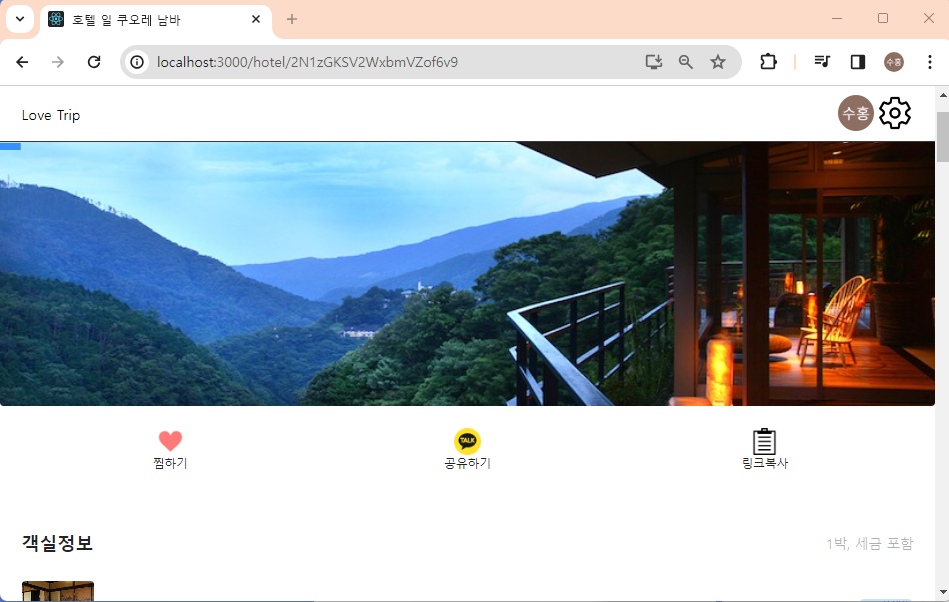
카톡에서도 메타데이터가 올바르게 적용된 사실을 확인할 수 있다.

참고
패캠 강의 고석진 강사님의 LOVETRIP
'프론트엔드 > 최적화' 카테고리의 다른 글
| Next.js SEO 최적화 및 검색엔진에 노출시키기 (2) | 2024.05.03 |
|---|---|
| react-lazy-load-image-component 을 활용해서 캐러셀 이미지 로드 최적화 (1) | 2024.01.13 |
| React lazy,와 Suspense를 활용하여 Code Splitting 하기 (0) | 2024.01.12 |
| Skeleton UI 로 Layout Shift 관리하기 (0) | 2023.12.25 |
| React Tree Shaking으로 번들 사이드 줄이기 (0) | 2023.12.24 |